


Android Notification With No Intent
Posted by admin on
February 4, 2012
Okay, so there may be times wherein you do not want to pass an Intent to redirect users to an app whenever the user may tap on the notification. The quickest thing that I thought might work was to pass a null Intent to the Notification object.
However, this is wrong as it can lead to problems. The correct way is to do it like this
notification.setLatestEventInfo(context, "title", "message", PendingIntent.getActivity(context, 0, new Intent(), 0));
Try it. This should do the trick.
Donations appreciated. Every little $ helps. Or click Google +1.tags: intent, notification, null
No Comments
How To View PDF File From Android App
Posted by admin on
October 31, 2011
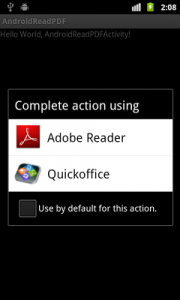
This helper method opens a PDF file from your Android app using any PDF related app installed in the smart phone. This is made possible with the use of an Intent object and setting its data and type so that it will recognize that it will be opening a PDF file.
If there is more than one app that can open PDF files, it will prompt you to choose which one you want to use to open the PDF file.
public static void openPdf(Context context, String filename) {
    File targetFile = new File(filname);
    Uri targetUri = Uri.fromFile(targetFile);
    Intent intent = new Intent(Intent.ACTION_VIEW);
    intent.setDataAndType(targetUri, "application/pdf");
    context.startActivity(intent);
}
tags: android app, app, Applicationpdf, file, intent, open, pdf, view
1 Comment
Call The Compose SMS Form In Android
Posted by admin on
September 20, 2011
Here is a method that returns an Intent object reference in order for Android to open up the compose SMS form.
public static Intent textNumber(String txtnumber) {
    return new Intent(Intent.ACTION_VIEW, Uri.parse("sms:" + txtnumber));
}

then just call context.startActivity(textNumber("your_number"));













