Gadget Advisor

If you are an avid gadget lover who is constantly on the hunt for new gadgets out in the market, Gadget Advisor provides all that. Rather than seeping through lots of news, it provides you with the latest and up to date stuffs considered the best, are displayed to you so you can be sure that items displayed are the top gadgets. The site looks professional and clean. Navigating around is pretty much easy. After some surfing through the site, I could tell the theme looks like a blog rather than some sort of commercial site.

After checking its computer software section, wanting to check on the best Windows software downloads for a video converter, I chanced upon a review for Blaze Media Pro. Good review for a great all in one software. I also stumbled upon some of the best Firefox extensions. Of course, these can all be found in Firefox’s website but I barely go there. Upon checking it out, I did manage to install one of them, the AdSense checker, which lets you keep track of your AdSense earnings without having to login to your AdSense account. Pretty Cool.

You can subscribe to their RSS feed if you wish to be updated all the time rather than having to go to their site to check out any new updates.

Like what you see? Buy me a cup of coffee. Or subscribe to my feeds.

(2 votes, average: 4.50 out of 5)
 Loading ...

Enable Word Wrap In Visual Studio 2005

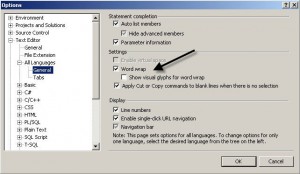
To enable word wrapping in Visual Studio 2005, follow the instructions below.

On the Tools menu, select Options.
Open the Text Editor folder
Open the All Languages folder
Select General

Under Settings – select the Word wrap option

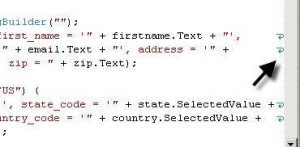
If you enable visual glyphs for word wraps, little arrows appear on the end of the line, signifying that the next text is word wrapped to the next line.

Like what you see? Buy me a cup of coffee. Or subscribe to my feeds.


(No Ratings Yet)
 Loading ...

Casino U.S. Players

If you are a player from the U.S., then Casino US Players is just the right online guide for you. It offers guides of online casinos accepting US players. Each specific is detailed as a guide to help you, the player, choose which casino may suit your preferences. The guides are not just for descriptions. Game-play guides help you understand its rules on how a game works. Casino listings are provided with its own review to give you an idea what to expect. With this, they provide you with the best US online Casinos listing and reviews so you can start reading the guides right away. Nowadays, there are lots of online Casinos and a lot of players who love playing at the comfort of their own home rather than going to a real Casino. Casino US Players even provides tips in finding the right Casino for you. It is also not just about you finding the right Casino. The guide makes you aware of the most common online Casino mistakes that people make furthering your knowledge on being a good online Casino player.

As an added bonus, especially if you are a Bingo and Poker gamer, they offer reviews of them aside from their US casino reviews.

Like what you see? Buy me a cup of coffee. Or subscribe to my feeds.


(No Ratings Yet)
 Loading ...

ASP.NET: Disable, Enable Validator Using Javascript

Doing this is pretty easy, if you know how or what method to use. I wanted to disable a Validator for a province TextBox if the country DropDownList chosen is USA because the state DropDownList will be enabled so the province should be inactive. Doing this server-side may be easy, but I wanted to use client-side Javascript so that no request will be sent whenever the OnChange event of the country’s DropDownList gets fired. Luckily, there is already a pre-made function in Javascript that disables Validators.

provinceValidator = document.getElementById('ProvinceValidator');
ValidatorEnable(provinceValidator, false);

Just set the second parameter as either true or false to enable and disable a Validator. I hope this will help those who have no clue how to go about it like I did until I found out about this function.

Like what you see? Buy me a cup of coffee. Or subscribe to my feeds.


(1 votes, average: 5.00 out of 5)
 Loading ...



