AttenAlert

AttenAlert is a new reputation monitoring app tool to keep track of sites based on the keyword(s) you specify. You get references to various sites that it finds because it has lots of sources to do the searching. Its concept is a bit like Google Alerts although the limitation here is that you only get alerts based in the Google indexes. AttenAlert provides more features than just email alerts. You can also subscribe to RSS feeds as an alternative to email alerts.

The tool uses the technology of web services. Although the service is not free, billing you at a fixed monthly rate, you can try the service for a 7 day free trial. The user interface is pretty clean and professional. Reading through the reports is very easy to peruse. And, because it is hosted by well known hosting firm Rackspace, you can be assured no downtime will hinder you from access.

Like what you see? Buy me a cup of coffee. Or subscribe to my feeds.


(No Ratings Yet)
 Loading ...

Casino Newbies

New to online casinos and such? If you are a newbie wanting to learn how to play in online casinos, casinonewbies.com provides you all the necessary online casino guide to get you started and guide you in everything from gameplays to casino reviews to help you choose which casino is best suited for your preferences, casino tutorials and … if you are not yet ready to play for real, you can try out their online games to give you a firsthand feel on how it may be like playing in a real online casino.

Do not worry because playing for fun games does not require you to deposit real money. Virtual money is provided so you can play the game without the worry of losing. The site is displayed in a blog type format. The look and theme is clean and professional and navigation around the site is easy. Keep up to date with regards to the gambling world by checking out their news. Before you start playing in an online casino for real money, you ought to learn how to play the game and how to strategize your way into winning. Casinonewbies.com gives you all that a newbie needs, and more …

Like what you see? Buy me a cup of coffee. Or subscribe to my feeds.


(No Ratings Yet)
 Loading ...

C#: Passing By Reference

Even if you know Object Oriented Programming in certain languages like Java, learning C# is totally different. One of the features that varies greatly in C# from Java is passing values by reference as parameters of methods. In Java, data types are automatically passed by value while classes are passed by reference. Good thing I decided to read out a beginner’s book for C#.

In C#, if you want to pass objects by reference, you would have to use the keyword ref. Take for example the sample code below

string str = "haha";
 
public void change(string param) {
	param = "hoho";
}

If you would call the method change() like this

change(str);
Console.WriteLine(str);

the output for the object str would be haha instead of hoho. You would have to use the ref keyword for this to work

public void change(ref string param) {
	param = "hoho";
}

Data types are a different story. To do the same way to data types as parameters in methods, you would use the out keyword like this

int i = 1;
 
public void change(out int param)_ {
	param = 10;
}

Calling the change method

change(i);
Console.WriteLine(i);

will output 10 as the value. If you do not use the out keyword, the value of i will still be 1.

Like what you see? Buy me a cup of coffee. Or subscribe to my feeds.


(1 votes, average: 4.00 out of 5)
 Loading ...

Visual Studio 2005: Create A Web Service And Client

This post assumes you have basic knowledge about web services but have no idea how to make one using the .NET framework. To create a web service in .NET in Visual Studio 2005,

Go to File > New > Website , choose ASP.NET Website and name the Project WebService1 (although you can name this any way you want).

Visual Studio 2005 will automatically create the necessary files for you. Note that since it created a .NET web service file called Service.asmx, a code behind file is also created called Service.cs (assuming your language is C#) under the App_Code folder.

Notice in Service.cs, a function that returns a string called HelloWorld is pre-made for you. Now, just compile your project and the IE browser will pop up loading the list of web services found. You can then see your HelloWorld web service there.
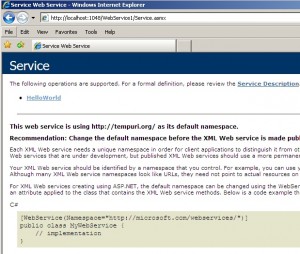
Click on the HelloWorld web service link and click the INVOKE button to check if the web service is running perfectly. Once you click on the INVOKE button, you will see an XML response similar to the one below

<?xml version="1.0" encoding="utf-8" ?>
<string xmlns="http://tempuri.org/">Hello World</string>

That’s it. You can see that your web service is running perfectly. What is a web service without having something to use them right? We shall now create a client to access and use the web service. This is pretty important so be careful how you add a new application to your existing project. To create an application within the same project,

Go to File > Add > New Project , choose Windows Application and name it WSClient. Once added, you will see that your Application and Web Service souce files are now in the same project.

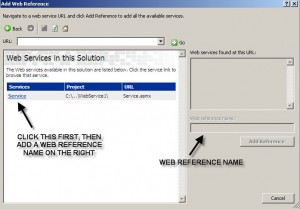
To make use of the HelloWorld web service, right click WSClient in the Solution Explorer and choose Add Web Reference.

Select Web Services in this solution and it will look for available web services.

Choose the Services labeled Service and type in localhost as the web reference name (the web reference name is entirely up to you).
Now we head on to the Program.cs file so we can add code within the Main() method to access the web service. Add the following code.

localhost.Service ws = new localhost.Service();
Console.WriteLine("->" + ws.HelloWorld());
Console.ReadLine();

Right click WSClient in the Solution Explorer again and select Set as Startup Project. This ensures that your application will be run and accesses the web service. If you know debugging, place a breakpoint on Console.ReadlLine(). Click Debug from the menu and choose Start Debug. Now, see the Hello World string outputted to the console.

Like what you see? Buy me a cup of coffee. Or subscribe to my feeds.


(3 votes, average: 4.00 out of 5)
 Loading ...





