I have seen quite a number of games with the label THD. Even when I tried to install them in my Samsung Galaxy S2, it gave out an error message informing me that it is not compatible with my phone. Luckily, there is a way to circumvent this limitation through the use of Chain Fire 3D.

It is an Open GL driver that is available from the Android Market for free and can be used to play Tegra Zone games on otherwise unsupported Android devices! Chainfire3D requires the use of additional plugins to achieve and here is how to do it.

  1. Install the Chainfire3D from Android Market.
  2. Download the rar archive file that contains the driver through this link.
  3. Extract the archive and copy the ibGLEMU_NVIDIA.zip to the root of your device SDcard.
  4. Now launch the Chainfire3D application and select CF3D driver > Install. After the installation your device will reboot.
  5. After rebooting, open the app again and select Install Plugin. Now the app will scan your SDcard for the plugins. After scanning, select the libGLEMU_NVIDIA.
  6. Now select Default OpenGL settings > Use plugin > NVIDIA to add support for Tegra games on your device.
  7. Finally select the “Fix Market settings” option from the main menu. This will allow you to download the Tegra Zone games on your unsupported device to play.

For option #7, you will need the pro version of Chainfire 3D to do this. But, if you can find cracked apps of Tegra games, then no problem.

Now, go play some great Tegra game zone games like Pinball, Fruit Ninja and Riptide.
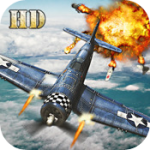
Air Attack is the very first game that I thoroughly played in my Samsung Galaxy S2 phone. This game is amazing! Featuring stunning 3D graphics alongside great audio, effects and awesome gameplay, I wonder if I could even finish the game other than easy mode considering I did not have an easy time playing the easiest mode.

But still, this game is worth it. You choose on either 2 unique planes and upgrade them with weapons, shields and power ups to help you fight your way through hordes of enemy planes and taks. Not to mention those uber giant end level bosses.

The object of the game is to destroy your enemies and survive each mission. Simple as that.

I never had problems with the controls which is one factor why I was able to finish the game ;). If the controls are bad, man … good luck trying to finish all the levels.

I have only seen a few good HD games and most of them come from Gameloft. The creator of the game Art In Games, did a hell of a job making this one for the Android platform.


Frankly speaking, there is no way. I was surprised when I kept looking through all the settings to find nothing on how to disable the screen time out in a Samsung Galaxy S2 phone. The screen time out only has options for 10 minutes at the most.

I hate screen time outs, hence the need to disable it. Keep Screen, an Android app is the solution for this. While it does not disable screen time outs in general, it will keep your phone from timing out on certain applications that you set not to time out.

The app is free. Last I saw, it said “for now” so better hope when you go to the Android Market and look for it, it is still free.

Related Posts Plugin for WordPress, Blogger...