 When I had the job interview last weekend, I was asked if I had experience with Accordion Menus. Accordio-what??? I thought it was some kind of Javascript framework for easily creating menus.
I was only able to know what it was about until it was workday again and I got to surf for it so I could check what it was exactly. So, an accordion menu is actually a type of a menu that expands content (can be sub menu items or text or image or whatever).
The sample menu that was given to me to modify came from this site. The accordion menu in that URL was created using JQuery and is limited to one level only. There are no sub-menus. I think I did badly in that exam since I have never used JQuery extensively unless they were show() hide() funtionalities.
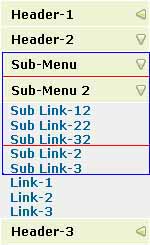
I decided to check JQuery out and try to make it work. What I did was use the same CSS class attributes and changed the code to cater sub-menus no matter how many level(s) a menu item has. The finished code would create an accordian menu that looks like the image on the right. I highlighted the sub-menus as blue and red.
I am not much of a CSS stylist so it is up to you to change the existing CSS code to, let’s say, have the text move a bit to the right so that they all won’t be aligned vertically.
Here is the JQuery code
|
1 2 3 4 5 6 7 8 9 10 11 12 13 14 15 16 17 18 19 20 21 22 23 24 25 26 27 28 29 30 31 32 33 34 35 36 37 38 39 40 41 |
$(document).ready(function() { var clicked_menu_head; var speed = 300; $('.menu_head').click(function() { clicked_menu_head = $(this); if (clicked_menu_head.next().is(':visible')) { clicked_menu_head.next().slideUp(); clicked_menu_head.css({backgroundImage:"url(left.png)"}); } // if clicked menu head is submenu, check if there are any submenus in it, then hide clicked_menu_head.next().find('p.menu_head').each(function () { $(this).next().slideUp(speed); $(this).css({backgroundImage:"url(left.png)"}); }); parent_menu_head = clicked_menu_head.parents('div.menu_body').prev(clicked_menu_head.parents('div.menu_body').size()-1); if (clicked_menu_head.next('div.menu_body').is(':visible')) { } else clicked_menu_head.css({backgroundImage:"url(down.png)"}).next('div.menu_body').slideDown(speed); $('#firstpane').children('p').siblings('p').each(function() { // loop through each main menu, if not equal, hide all sub menu if (parent_menu_head.attr('id')) { if (parent_menu_head.attr('id') != $(this).attr('id')) { $(this).children('div.menu_body').slideUp(speed); } } else { if (clicked_menu_head.attr('id') != $(this).attr('id')) { $(this).css({backgroundImage:"url(left.png)"}) $(this).next().slideUp(speed).find('p.menu_head').each(function() { $(this).next().slideUp(speed); }); } } }); }); }); |
And this is the HTML code. I provided 1 menu item sample that has 2 sub-menu levels.
|
1 2 3 4 5 6 7 8 9 10 11 12 13 14 15 16 17 18 19 20 21 22 23 24 25 26 27 28 29 30 31 32 33 34 35 36 37 38 39 40 41 42 43 44 45 46 47 48 49 50 |
<body> <div style="float:left" > <!--This is the first division of left--> <p><strong> Works on clicking </strong></p> <div id="firstpane" class="menu_list"> <!--Code for menu starts here--> <p id="header1" class="menu_head">Header-1</p> <div class="menu_body"> <a href="#">Link-1</a> <a href="#">Link-2</a> <a href="#">Link-3</a> </div> <p id="header2" class="menu_head">Header-2</p> <div class="menu_body"> <div class="menu_list"> <p id="submenu" class="menu_head">Sub-Menu</p> <div class="menu_body"> <div class="menu_list"> <p id="submenu2" class="menu_head">Sub-Menu 2</p> <div class="menu_body"> <a href="#">Sub Link-12</a> <a href="#">Sub Link-22</a> <a href="#">Sub Link-32</a> </div> </div> <a href="#">Sub Link-2</a> <a href="#">Sub Link-3</a> </div> </div> <a href="#">Link-1</a> <a href="#">Link-2</a> <a href="#">Link-3</a> </div> <p id="header3" class="menu_head">Header-3</p> <div class="menu_body"> <a href="#">Link-1</a> <a href="#">Link-2</a> <a href="#">Link-3</a> </div> </div> <!--Code for menu ends here--> </div> </body> |
Notice that in <p> and div tags (with ID firstpane), I added the attribute ID to give them unique identifier names. This is mandatory in my code because I used the tag’s ID to check if the menu header clicked is a parent menu header or a sub menu header.
Make sure that you have a main container, in this case, firstpane with CSS class menu_list. Next in the CSS sequence are the menu_head and the menu_body (contains your menu items or more sub-menus).

Thanks for posting the modified version of menu I’ve created…….
cheers…..
This is the problem with different words that everyone use in computer world.. Its confusing only to find out that you the aspect, just used in a different name
Beyond The Rave Reality, Computer and Electronics,
great posting, i will use it on my O2, thanks
cool. let us know your site’s url so other people can see it in action. thanks
can you supply a url to the example shown so we can see it in action and view the css as well. Thanks!
hi coffey, my post has the link to where i based my modified version of jquery. you can get the css file there and the original jquery code.
then just change that code with mine. it should show the same accordion menu as the image in my post
sweet thanks for that this looks exactly like what I need if I can get up to 5 submenus working…
wow 5 submenus huh. i only tried mine until 3. but that code should work for 5 or more.
you would have to modify the css for that since i did not do any css for indentation on the sub menus.
yep I should be able to fix the css no problem but I’m trying to change the code so that it reads from a list and not divs. I have changed the javascript so that instead of using “#firstpane p.menu_head” I’m using “#leftCol li.menu_header” and in the function instead of using “$(this).css({backgroundImage:”url(down.png)”}).next(“div.menu_body”).slideToggle(300).siblings(“div.menu_body”).slideUp(“slow”);” i’m using this “$(this).css({backgroundImage:”url(‘images/subnav_arrowDown.gif’)”}).next(“ul.sideNavInner”).slideToggle(300).siblings(“ul.sideNavInner”).slideUp(“slow”);” but it’s not working…any ideas were I’m going wrong?
sorry, pretty busy at the moment. im not used to jquery stuffs so i might have to review it again. if you do solve it please share it here. as well as your css if you managed to do indentation for sub-menus. thanks coffey
Great script! It’s very small and not so complex as the orginal accordion provided by jquery. I do have an question:
Imagine I have 3 subnavs called A B C. When subnav A is opened and I click on subnav B, subnav A stays open and subnav B opens as well. But what if I want the subnav A to be clossed?
hi phil. great that you found it useful, you can subscribe to my feeds for more updates and please do rate this post.
what you can do is loop through all ids that are on the same level as your subnavs and call hide() on them except the subnav that you clicked. that is how i did it with the upper level menus.
Thanks for the fast reply. I never quit understood javascript. I can read it, but adjusting the script is beyond my powers. (I’m more the css - html guy) I debugged the shit outa the script.
I tried adding lots of hide functions such as: parent_menu_head.attr().is(‘hide’))
but it’s all without result.
Can you guide me into the right direction? It would be a great asset to the script!
honestly, i would have to review jquery again which would take up my time since i have forgotten about this.
if you do manage to get it, please place a link to your site so others can benefit too. thanks
thankyou for the code,
I revised your code to hide submenu’s if a diffrent submenu is clicked
i can mail it if requested?
hi roshan,
doesnt my code do that? cant remember though because i have never touched that code after i posted it here.
still, sure. you can email it to me and i will post it here and give you full credit.
thanks!
roshan, i checked my code and it does close the other submenus when a different submenu from a different header is clicked.
still, i will still post your code if you want to share it. just let me know
lol a number of the feedback people write are so silly, again and again i contemplate if they seriously read the writing and content before writing a comment or if perhaps they only just read the title of the article and type the very first idea that one thinks of. anyhow, it is really relaxing to look over smart commentary once in a while instead of the same, outdated oppinion vomit which i mainly notice on the net i’m off to take up a couple of hands of facebook poker regards
howdy nice little journal you got there 😉 I use the same web theme on my website yet somehow for whatever odd issue it looks to load easier on your site despite the fact that this blog has got a little more content material. Are you applying any specific plug ins or widgets that quicken it up? Do you think you could quite possibly display the programs so I would be able to use these on my web pages so twilight breaking dawn supporters could watch twilight eclipse online trailers and films easier I would be pleased - many thanks in advance
Hello, I want to post a solution related with a question made by Phil about
a possible way to hide an open submenu when a sibling submenu is opened.
This is my first real contact with jQuery so I hope this approach be a useful solution.
clicked_menu_head.parent().children(‘p’).siblings(‘p’).each(function() {
// loop through each main menu, if not equal, hide all sub menu
if (clicked_menu_head.attr(‘id’) != $(this).attr(‘id’))
{
$(this).css({backgroundImage:”url(left.png)”});
$(this).next().slideUp(speed).find(‘p.menu_head’).each(function() {
$(this).next().slideUp(speed);
});
$(this).next().slideUp(speed);
}
});
hi. thanks for the code snippet. i’m sure others will find this useful.
I have searched google for months and i can say you have the best 4 level accordion menu on the internet.
@yinka: wow! thank you for the nice compliment
@Jean Solis: Thank you for posting your solution to hide an open submenu when a sibling submenu is opened. Could you please show where to insert this snippet into the existing Javascript code, as I have tried but I think I am inserting it in the wrong place as it makes the menu stop working. Apologies, I am just learning Javascript. Thanks, and thank you Tech for the menu.
I like your adaptation of Roshan’s menu. (You should have got the job!!) Have you done a version that works with mouseover instead of clicking? also, is there a way of the submenu staying open when a link is clicked so you still have access to other links in the same submenu?
naah, i never did anything more other than this one. sorry.
Sorry I wasn’t aware of these updates on this post, relating to your question, addi, I checked the last version I did for this menu, and the final code is pretty different from the one I post a few months ago, anyway if you still need it, or if could be useful for someone else, I post this last version but this time I will be more specific :-P, the next code must replace the original code from line 24 to line 39, and please be aware of the quotation marks, otherwise the code possibly will not run.
//Hide submenus
if(clicked_menu_head.parent().attr(‘id’) == ‘firstpane’)
{
//First level
clicked_menu_head.siblings(‘p.menu_head’).each(function(){
if($(this).next().is(‘:visible’))
{
$(this).next(‘div.menu_body’).slideUp(speed);
$(this).next().find(‘p.menu_head’).next(‘div.menu_body’).slideUp(speed);
}
});
}else{
//Deeper levels
clicked_menu_head.parent().siblings(‘div.menu_list’).each(function(){
if($(this).children(‘div.menu_body’).is(‘:visible’)){
$(this).children(‘p.menu_head’).next(‘div.menu_body’).slideUp(speed);
$(this).find(‘div.menu_list’).children(‘p.menu_head’).next(‘div.menu_body’).slideUp(speed);
}
});
}
@jean solis: thank you for your contribution. i may have use for this in the future he he he
really i were wondering for this type of code only but where is the css code without the css code how v can refer the id and class which is in div tag
@anthony: the css does not have anything to do with this. there is html code in this post where the IDs are identified
Hi, how can one modify your script to have the second level to give a slideout menu to the right when the mouse is over them?
@jaybee: i have not touched this code after i made it. you will have to figure it out as i have forgotten about jquery now.
Hi.
Thank you for making the only actual tutorial that I’ve been able to find. Other ‘tutorials’ haven’a actually explained how to do things, but you did so, very clearly.
Thanks..