The Buy Me A Pie! Grocery List App For iOS And Android Devices

This is a sponsored post written by me on behalf of “Buy Me a Pie!” grocery list for SponsoredTweets. All opinions are 100% mine.

At first glance, I thought the look and feel of the app looked liked a recipe list with all the food listings looking like ingredients. But that was during the first time I ran the app.

After all, I wanted a grocery list app to help me with my shopping and thought of trying the Buy Me A Pie! Grocery List app.

Once I sifted through how it works, I finally got the hang of it.

Really. I am not much of a tech junkie but if I was able to understand easily on how to use the app, I am sure that you too can get the hang of it quickly. And this is because the user interface was designed for any user to be able to add and remove items in the list.

One of the things I hate with traditional groceries is having a list to keep tabs on what I need to buy at the grocery. For one thing, using the app, you can scrap that list and check it from within your smartphone.

Even better is that you can keep your lists in sync with your family or friends by sharing your account. With this feature, anybody that you shared your account with can add or change items on the go from anywhere using any device.
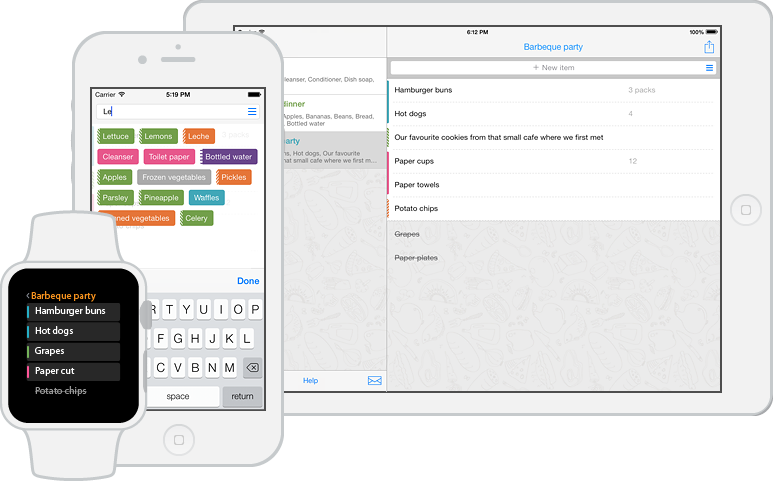
The best way to appreciate how the app can help you with your grocery duties is to use it. Try it!

The “Buy Me a Pie!” grocery list is available for iOS and Android devices, both for smartphones and tablets. Got an Apple Watch? It works there too!
Remote Access Tool With Lite Manager

This is a sponsored post written by me on behalf of LiteManager for PayPerPost. All opinions are 100% mine.

LiteManager Pro is a remote access software for remote administration of computers over the Internet or remote control in a local network, for distant learning, providing remote support to users and supervising work activity of employees.

You can get remote access to computers and manage enterprise networks from anywhere in the world. Using LiteManager is convenient, fast, and reliable which allows for remote access to an office or home PC and is perfect for remote operation.

The software is optimized for work on a terminal server where you can manage each user individually, switching between them which will save the company money and resources.

LiteManager can be put to great use in educational institutions where the “show remote desktop” feature will allow for organization of on-line presentations and distance learning.

The program is ideal for computer classes where teachers can supervise the students’ work, show their desktops to the whole class, and organize collaboration.

You can give this a run through with their free version where you can control up to 30 computers simultaneously free of charge! This way, you can get a feel on how good this software really is!

Visit the website and download the free version of LiteManager remote access software!

The Benefits Of Drug Testing In A Company

This is a sponsored post written by me on behalf of USAMDT of Atlanta for PayPerPost. All opinions are 100% mine.

Who doesn’t want a drug free working environment in the first place, right? Random drug testing is common place but not every company actually takes this into consideration hard.

But they should, considering the various benefits that an employer can reap from a drug free working environment.

Employees are selected randomly for drug and alcohol testing. In addition to random selection, the time and date of the test are kept a secret until just prior to conducting it.

These measures prevent employees from avoiding it or preparing ahead of time. After all, so many people know what to do to avoid getting caught if they know firsthand when drug testing events can happen.

The good thing about random drug testing in companies is that all employees and volunteers, regardless of their title or position within the company are subject to drug testing. Nobody is safe. Any safety sensitive personnel, such as equipment operators, mechanics and construction workers should be included in the selection pool.

So how does this work?

When an employee has been selected, they must proceed immediately to the collection site. Any time spent taking a required drug test is considered hours worked under the Fair Labor Standards Act so employees must be paid for that time.

The USAMDT will set up the collection site at your location or the location of your choice so there is very little downtime and employees do not have the opportunity to cheat the test.

Results can be obtained from urine, saliva, or hair samples, so we can conduct random drug testing anywhere, even if privacy is not available.

Drug test results are considered personal health information, so there are restrictions on whether and how the information can be shared with others. This is why employers need a release form signed by employees prior to drug testing.

Wouldn’t you want to work in a drug free environment? If you are a high ranking officer, nobody will respect a drug addict heading the company they work for. Strive for a drug free work environment. Do random drug testing in your company now!

Related Posts Plugin for WordPress, Blogger...