


Data Recovery For Mac Using Disk Drill
Posted by tech on
January 24, 2011
 When the Time Machine feature for the Mac operating system was introduced, I thought right away: why do I need this? It automatically saves up to date copies of everything on your Mac like photos, music, videos, documents, applications and settings. If you ever have the need, you can easily go back in time to recover anything. But then again, it eats up a lot of space in the process.
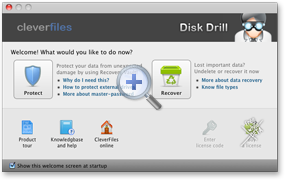
Some people like me do not like having extra space used for backups or anything. If ever I need to recover lost data, I need a data recovery software that does the job right. I checked out a good one called Disk Drill by CleverFiles.
It features a unique recovery vault technology to help prevent data loss, recovers data from HFS/HFS+/FAT/NTFS and other file systems, deep scanning for low-level data recovery, recover all types of files, recover data from internal & external hard drives & other media and is designed natively for the Mac.
With a very easy user interface, data recovery can be done in just a few clicks. Best of all, it is free! Download the Disk Drill Mac data recovery now!
Donations appreciated. Every little $ helps. Or click Google +1









