MacBook Top Case

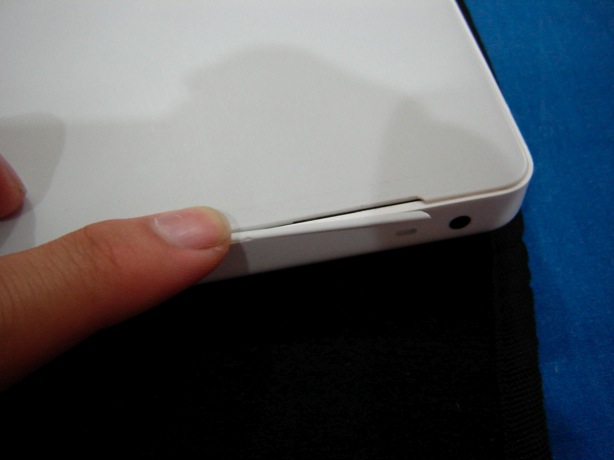
I am one of those victim of Apple Macbook’s Top Case Dilemnas. I never knew about this until I experienced one myself with my Macbook. Just recently, I suddenly heard sort of a soft crack or tick while I was using my Macbook. I looked for it and noticed a small crack just near the corner of the laptop (see attached photo). I’ve read that the later Macbooks don’t have this problem but just to be on the safe side, careful when you lower your laptcop screen when closing it. I’m going to have my cousin buy it probably next year. The whole incase for the Macbook costs only like 50$ if you buy it in Apple Store. Don’t buy it here in the Philippines because it’s so expensive. A Whopping P5,500
when I inquired in Cebu’s I-Store for the top case only. Plus a P500 charge for changing it. If that would be its price, how much more for the whole case itself, yikes! That thought is financially scary hahaha. Apple should provide a replacement top case for customers who bought these laptops. It’s unfair that I have to depend on warranty (which just expired 2 months ago) and this was a case defect to begin with while I bear the fact that I’ll have to buy a new top case for replacement. It’s Apple’s responsibility to sell durable stuffs. Even my in case have small cracks on the side. Best bet for me is to buy a whole new case for the laptop.


Like what you see? Buy me a cup of coffee. Or subscribe to my feeds.


(2 votes, average: 5.00 out of 5)
 Loading ...

Hug A Programmer

Like what you see? Buy me a cup of coffee. Or subscribe to my feeds.


(No Ratings Yet)
 Loading ...

Google Chrome Out

Oh man! As if 2 browsers waging against each other isn’t enough, we have another one on board the browser wars. Google Chrome is finally out, Google’s very own internet browser. What’s nice about this browser is it maximizes your whole screen and does away with those useless icons and stuffs. What I really need visible in a browser is the menu bar, the address bar and the status bar. The browser does look weird with its UI interface because you don’t see a menu bar here. The menu items that you see in the other browsers are all clamped down in the 2 icons on the upper right side of the browser, just beside the address bar. The browser’s design for tab holders is sleek and is positioned at the top part of the browser (like IE’s design).

When running Chrome on startup, it redirects you to its speed page, like Opera’s feature. I prefer though that they provide an option what default page the browser should load upon startup. I want a blank page on startup rather than this speed dial-like page feature. My biggest disappointment with this browser is that it doesn’t have a status bar. When you hover your mouse cursor on top of, say, a hyperlink, a sort of tool tip label appears on the lower left corner of the browser. No matter what, I want a status bar in the browser he he he. The overall design of the browser makes you think that it’s a lightweight program since its UI make it look thin.

Now comes the hard part. I haven’t tested this browser for programming purposes but I hope that having Firefox and IE give different results are enough. Having another browser give more is a pain. Though I’m certain Chrome follows the standard.

Like what you see? Buy me a cup of coffee. Or subscribe to my feeds.


(No Ratings Yet)
 Loading ...

iTouch: TanZen

TanZen is the name of the iPhone/iTouch version of a Tangram puzzle game, which is a dissection game. It consists of seven pieces, called tans, which fit together to form a shape of some sort. The objective is to form a specific shape with seven pieces. The shape has to contain all the pieces, which may not overlap. Tanzen’s version helps a lot because the shape to follow is shaded dark, hence you will have a guide on matching it. This is a pretty old game and I never was fond of playing this with real tans because without the shaded shape to follow, I couldn’t focus on it much. With TanZen, I found out that I matched them pretty quick because of the shape’s shade. I hope to finish this game soon, I have been addicted to it lately. When you start off playing this game, you need to at least check out the help section to know how to use the tans.

When you click on a tan, a circular halo would appear. Dragging it makes you move the tan. If you wish to rotate it, press your thumb while using your other finger to rotate it. Double clicking on the tan will alter its direction (where the object is facing).

This game is worth it as it features lots of puzzles to offer you. I did encounter a bug. There was one tan missing and the game treated it as a cleared game. They missed this one out in quality assurance lolz. The game saves your current puzzle and state if you leave the program. You can also play a cleared puzzle again if you wish. Just tap on to the finished game and it will prompt you for it. One of the must-have games that is very worth it.


Like what you see? Buy me a cup of coffee. Or subscribe to my feeds.


(No Ratings Yet)
 Loading ...