


ASP.NET: GridView Control
Posted by tech on
November 2, 2008
One of the reasons why I’m impressed with asp.net’s rich set of controls is its GridView control. This control displays your data in a table structure complete with delete, update and select features. It even has paging in case you have lots of records in your database. The best thing about this paging is that everything is done for you, the links, the paging number, the paging labels and others. If you click a page link, it will retrieve the next set of record(s) for you without changing any SQL query. For example, you can use this SQL query to retrieve all records of the table.
select * from [table_name];
In MySQL, you would need to supply the LIMIT keyword in order to get a specific set of rows. With GridView’s paging feature enabled, everything is done for you. Neat huh. Took me like a day in getting this one to work though because I had problems with the update and delete function. Since I am using MySQL, turns out when you do parameters in your query commands, the @ sign does not work because it is only for MS SQL. You would have to change the @ to ?.
Take this sample asp.net code for a GridView control as an example. This assumes you have a working database connection to MySQL. If you do not know how to connect to a MySQL in asp.net, go here to use the custom MySQLProvider classes by Rakotomalala Andriniaina.
<asp:SqlDataSource ID="srcUsers" runat="server"
	ProviderName="MySql.Data.MySqlClient"
	ConnectionString="<%$ ConnectionStrings:db %>"
	SelectCommand="select pkid, username, email, creationdate from users"
	DeleteCommand="delete from users where pkid = ?pkid"
	UpdateCommand="update users set email = ?email where pkid = ?pkid"
>
</asp:SqlDataSource>

<asp:GridView ID="UsersGridView" runat="server" DataSourceID="srcUsers" AllowSorting="true"
			  DataKeyNames="pkid" AllowPaging="true" PageSize="10"
			  AutoGenerateColumns="false">
	<Columns>
		<asp:BoundField DataField="pkid" HeaderText="pkid" Visible="false" />
		<asp:BoundField DataField="username" HeaderText="Username" ReadOnly="true" SortExpression="username"/>
		<asp:BoundField DataField="Email" HeaderText="Email" />
		<asp:BoundField DataField="CreationDate" HeaderText="Creation Date" DataFormatString="{0:F}" readonly="true" SortExpression="creationdate"/>
		<asp:CommandField ShowEditButton="true" />
		<asp:CommandField ShowDeleteButton="true" />
	</Columns>

	<PagerSettings Mode="NextPrevious" PreviousPageText="< Previous" NextPageText="Next >" />
	<PagerStyle BackColor="#FFCC66" ForeColor="#333333" HorizontalAlign="Center" />
</asp:GridView>
If you read e-books regarding asp.net, the queries used are for MS SQL. It’s been a long time since I dabbled with MS SQL, so when I read about it, I thought the @ sign for parameters were required for any database used. Took me some time to know that ? has to be used. See the DeleteCommand and UpdateCommand properties of the SqlDataSource tag.
How you design your GridView control is up to you. With styles, you can override how the table would look like. The other GridView like control that I had used before that looks like asp.net’s version is the datagrid taglib for Java. The downside with using the taglib is that if your SQL query returns lots of rows, it may not load fast and may use up resources in doing so because it gets all records at one time. Asp.net’s GridView control totally impressed me in more ways.
Like what you see? Buy me a cup of coffee. Or subscribe to my feeds.tags: asp, asp.net, gridview
6 Comments
Mac OS Dashboard Birthday Widget
Posted by tech on
October 27, 2008
I looked for a good birthday widget in my Mac OS that would alert me for upcoming birthdays. It took me 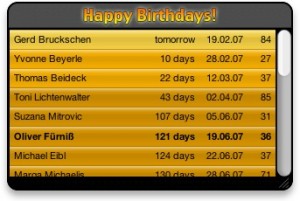 awhile to find the one I want and out of the others out there, I’d say Oliver Fornio’s Happy Birthday Widget is just what I needed. The UI display is simple, clean and tidy. The widget simply looks in your address book for birthday entries and lists them in the widget display. You can set the name display to either nickname or full name. The display shows how many days till your friend’s birthday comes and how old your friend will be. Just download the link here and double click the widget and press the install button then your widget will be automatically placed in your dashboard.
Adobe Flex 3
Posted by tech on
October 16, 2008
So I am trying out Adobe’s Flex technology. It is currently at version 3 so that says I am already way behind he he he. I have scoured the net for 2 days and have not found any good tutorials that detail it visually. Adobe offers an IDE for Flex development called Flex Builder 3 but it ain’t free. You’d have to buy it. Though it’s offered as a 60 day trial software. Seeing as how it’s a totally different technology and even though its ActionScript syntax looks a bit like Java, I opted to use an IDE for its sake. So I am using Flex Builder 3. I did not get the Flex plugin for Eclipse since there is no Flex 3 plugin for it yet so the standalone version was my only option.
Adobe Flex allows you to create rich internet applications. In simpler terms, Flex is an array of components at our disposal to use to ease client side presentation development. Take for example a grid table containing entries from a database. Rather than doing code to make possible client side interaction like search by column, or having a different color per alternate row, the grid table does this all for you. All it needs is an XML data that contains the entries from the database to be populated in it. See image below.
When I first started checking out Flex, I thought that the whole page presentation is stored inside Flex. And I was wrong. Flex is merely a set of components that offer lots of functionality on the client side. I just finished going through a simple tutorial that loads the entries from the database using PHP. Scripting languages like ASP, PHP, JSP or Cold Fusion can be used in conjunction with Flex.
Like what you see? Buy me a cup of coffee. Or subscribe to my feeds.






