
A sign that stands out in Times Square or is an iconic part of a city’s skyline has gone beyond sending a message. It’s a part of the lives of those who live and work there.

The idea it brings is strong and enduring. With a global presence, Priority Sign offers insight into their success on their website. They share the factors that they use to bring a new or existing brand to the public through a custom signage campaign.

In addition to the practical aspects of their large-scale sign manufacturing business, Priority Sign creates outdoor signage reflecting new or existing logos which reach the public in a very unique medium. Larger than life and illuminated to present identity authority, they carry the brand to the public day and night.

Experience is the key to selecting the right type of sign that brings the brand identity, fits the culture and local style, and stands out in the memory of those who have seen it. Signage is a large investment, even more so on a national or global basis.

Priority Sign’s outdoor signage expertise brings 10,000 projects to life in 80 countries annually. At this scale, they can offer complete turnkey signage packages with confidence.
So you finally ran AndroVM. Now you want to use it to replace the clunky and resource hogging Android emulator with your Eclipse GUI.

To do so, make sure you know the IP address of your Android virtual machine. The default is 192.168.56.101. But if you want to change the default IP address, here is where you can find it.

  • In Oracle VM VirtualBox, go to File > Preferences > Network
  • Click on the label on the right that says Virtual Host-Only Ethernet Adapter
  • Click the 3rd icon that looks like a screw driver
  • Under the DHCP server tab, look at the Lower Address Bound

That is the IP address of the virtual machine. See photo below for a screenshot.

Now, once you have the virtual machine up and running, to link it to Eclipse so that it will use that as your test environment when running your apps, open MS-DOS prompt.

Go to where your Android sdk is installed. I installed mine in c:\program files\Android\android-sdk\platform-tools

Then type adb connect 192.168.56.101.

You will know if connection was successful by typing adb devices. Your IP address should be there.

Now in Eclipse, when you deploy your app, do the following:

  • Right click on the project name, choose Run As > Run Configurations
  • Go to Target tab and select Always prompt to pick device.
  • Click Apply button

Once you deploy your Android app, a popup window will show first giving you a list of Android related devices running (your virtual machine included).

Today’s mobile professionals are expected to be productive no matter where they are. And while most of us carry lightweight, slim laptops and tablets which are convenient for travel, having small screens can put strain on the back and neck.

Portable laptop and tablet stands are solutions however, not all of them enables users the perfect way to create a mobile ergonomic work space that nurtures one’s body.

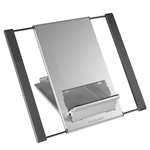
Goldtouch Portable Laptop Stand is made with comfort by design feature so users will always feel relaxed and comfortable when using their tiny devices.

This table stand folds up flat and weighs just 1 lb. It is space-saving and light where you can easily slip them into your purse, a laptop bag, backpack or even a briefcase without missing a beat.

This laptop or desktop stand can be adjusted bring your screen right to eye level, preventing unhealthy hunching and craning. With 6 to 7 different height adjustments, this number of adjustment levels should give you enough options to get the right position for you.

These tablet stands are not specific to any brand. Use them on any kind of tablet devices or small laptops. Think about your health and comfort when using your devices. Think GoldTouch!

Related Posts Plugin for WordPress, Blogger...