Now, suppose you looks iPad bookmarks. Do you think you can restore them back using iTunes? No. Because that is all there is to it with iTunes, just a store in the first place.

In order to enhance the possibility of your bookmarks getting recovered in your iPad device, you better not sync your iPad with iTunes thereby avoiding overwriting the previous iTunes backup file. Also, do not use your iPad again if you want to directly recover data from the device without iTunes backup.
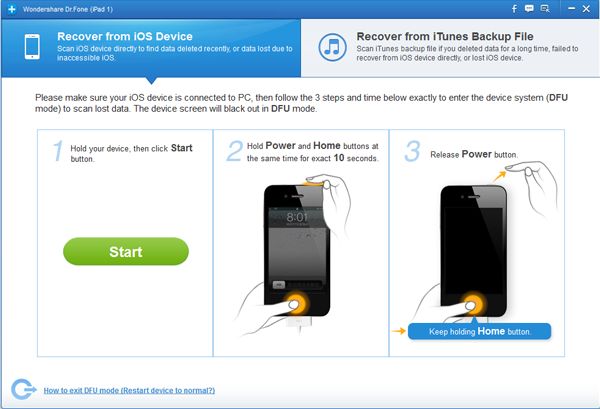
The next step is to get a tool that can let you recover iPad Bookmarks. Say, Wondershare Dr.Fone for example. This application comes in both Windows and Mac OS versions.

After you install the application, the rest is as easy as 1-2-3. Click a few buttons here and there and the application does the rest for you.

After the scan, you can preview all the bookmarks that it has seen and whichever bookmark that you want back, simply get them in just one click.

So easy, right?

Bookmarks may not mean much to others but for some, those bookmarks are bookmarked for a reason. Check out this ipad bookmark recovery application.

There is no functionality in Javascript where you can get all elements by class name. Yes, in JQuery you can but that involves loading up a library.

If you do not have any other need for JQuery, this class made by some user in the Stack Overflow forum does the trick.

So what is with a little Javascript library, right? Even though it is not hard work to go around to using forms in Javascript, using JQuery Form plugin enables me to gain access to my form after simple Ajax calls.

The main methods, ajaxForm and ajaxSubmit, gather information from the form element to determine how to manage the submit process. Both of these methods support numerous options which allows you to have full control over how the data is submitted.

Their site says it is extremely useful for sites hosted in low cost web hosting providers with limited features and functionality. But even so, JQuery‘s simplistic approach and flexibility created this awesome plugin that enabled me not to have to code on doing Ajax calls the traditional way.

Say, you have this HTML form.

Simply initialize your form when the DOM is ready. Once the form is submitted, you can get what is returned from the server. Easy, right?!

Related Posts Plugin for WordPress, Blogger...