


Create Accordion Menu Using JQuery
Posted by tech on
November 25, 2008
When I had the job interview last weekend, I was asked if I had experience with Accordion 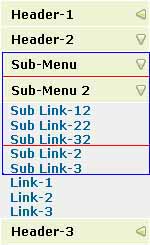 Menus. Accordio-what??? I thought it was some kind of Javascript framework for easily creating menus. I was only able to know what it was about until it was workday again and I got to surf for it so I could check what it was exactly. So, an accordion menu is actually a type of a menu that expands content (can be sub menu items or text or image or whatever).
The sample menu that was given to me to modify came from this site. The accordion menu in that URL was created using JQuery and is limited to one level only. There are no sub-menus. I think I did badly in that exam since I have never used JQuery extensively unless they were show() hide() funtionalities. I decided to check JQuery out and try to make it work. What I did was use the same CSS class attributes and changed the code to cater sub-menus no matter how many level(s) a menu item has. The finished code would create an accordian menu that looks like the image on the right. I highlighted the sub-menus as blue and red. I am not much of a CSS stylist so it is up to you to change the existing CSS code to, let’s say, have the text move a bit to the right so that they all won’t be aligned vertically.
Here is the JQuery code
1 2 3 4 5 6 7 8 9 10 11 12 13 14 15 16 17 18 19 20 21 22 23 24 25 26 27 28 29 30 31 32 33 34 35 36 37 38 39 40 41 | $(document).ready(function() { var clicked_menu_head; var speed = 300; $('.menu_head').click(function() { clicked_menu_head = $(this); if (clicked_menu_head.next().is(':visible')) { clicked_menu_head.next().slideUp(); clicked_menu_head.css({backgroundImage:"url(left.png)"}); } // if clicked menu head is submenu, check if there are any submenus in it, then hide clicked_menu_head.next().find('p.menu_head').each(function () { $(this).next().slideUp(speed); $(this).css({backgroundImage:"url(left.png)"}); }); parent_menu_head = clicked_menu_head.parents('div.menu_body').prev(clicked_menu_head.parents('div.menu_body').size()-1); if (clicked_menu_head.next('div.menu_body').is(':visible')) { } else clicked_menu_head.css({backgroundImage:"url(down.png)"}).next('div.menu_body').slideDown(speed); $('#firstpane').children('p').siblings('p').each(function() { // loop through each main menu, if not equal, hide all sub menu if (parent_menu_head.attr('id')) { if (parent_menu_head.attr('id') != $(this).attr('id')) { $(this).children('div.menu_body').slideUp(speed); } } else { if (clicked_menu_head.attr('id') != $(this).attr('id')) { $(this).css({backgroundImage:"url(left.png)"}) $(this).next().slideUp(speed).find('p.menu_head').each(function() { $(this).next().slideUp(speed); }); } } }); }); }); |
And this is the HTML code. I provided 1 menu item sample that has 2 sub-menu levels.
1 2 3 4 5 6 7 8 9 10 11 12 13 14 15 16 17 18 19 20 21 22 23 24 25 26 27 28 29 30 31 32 33 34 35 36 37 38 39 40 41 42 43 44 45 46 47 48 49 50 | <body> <div style="float:left" > <!--This is the first division of left--> <p><strong> Works on clicking </strong></p> <div id="firstpane" class="menu_list"> <!--Code for menu starts here--> <p id="header1" class="menu_head">Header-1</p> <div class="menu_body"> <a href="#">Link-1</a> <a href="#">Link-2</a> <a href="#">Link-3</a> </div> <p id="header2" class="menu_head">Header-2</p> <div class="menu_body"> <div class="menu_list"> <p id="submenu" class="menu_head">Sub-Menu</p> <div class="menu_body"> <div class="menu_list"> <p id="submenu2" class="menu_head">Sub-Menu 2</p> <div class="menu_body"> <a href="#">Sub Link-12</a> <a href="#">Sub Link-22</a> <a href="#">Sub Link-32</a> </div> </div> <a href="#">Sub Link-2</a> <a href="#">Sub Link-3</a> </div> </div> <a href="#">Link-1</a> <a href="#">Link-2</a> <a href="#">Link-3</a> </div> <p id="header3" class="menu_head">Header-3</p> <div class="menu_body"> <a href="#">Link-1</a> <a href="#">Link-2</a> <a href="#">Link-3</a> </div> </div> <!--Code for menu ends here--> </div> </body> |
Notice that in <p> and div tags (with ID firstpane), I added the attribute ID to give them unique identifier names. This is mandatory in my code because I used the tag’s ID to check if the menu header clicked is a parent menu header or a sub menu header.
Make sure that you have a main container, in this case, firstpane with CSS class menu_list. Next in the CSS sequence are the menu_head and the menu_body (contains your menu items or more sub-menus).
Donations appreciated. Every little $ helps. Or click Google +1










October 4th, 2010 at 6:11 am
naah, i never did anything more other than this one. sorry.
October 5th, 2010 at 7:09 pm
Sorry I wasn’t aware of these updates on this post, relating to your question, addi, I checked the last version I did for this menu, and the final code is pretty different from the one I post a few months ago, anyway if you still need it, or if could be useful for someone else, I post this last version but this time I will be more specific , the next code must replace the original code from line 24 to line 39, and please be aware of the quotation marks, otherwise the code possibly will not run.
//Hide submenus
if(clicked_menu_head.parent().attr(‘id’) == ‘firstpane’)
{
//First level
clicked_menu_head.siblings(‘p.menu_head’).each(function(){
if($(this).next().is(‘:visible’))
{
$(this).next(‘div.menu_body’).slideUp(speed);
$(this).next().find(‘p.menu_head’).next(‘div.menu_body’).slideUp(speed);
}
});
}else{
//Deeper levels
clicked_menu_head.parent().siblings(‘div.menu_list’).each(function(){
if($(this).children(‘div.menu_body’).is(‘:visible’)){
$(this).children(‘p.menu_head’).next(‘div.menu_body’).slideUp(speed);
$(this).find(‘div.menu_list’).children(‘p.menu_head’).next(‘div.menu_body’).slideUp(speed);
}
});
}
October 5th, 2010 at 8:21 pm
@jean solis: thank you for your contribution. i may have use for this in the future he he he
May 12th, 2011 at 7:00 am
really i were wondering for this type of code only but where is the css code without the css code how v can refer the id and class which is in div tag
May 12th, 2011 at 7:03 am
@anthony: the css does not have anything to do with this. there is html code in this post where the IDs are identified