


Sort JTree
Posted by admin on
November 15, 2009
Sorting a JTree‘s nodes is easy. Just make sure your nodes are of type DefaultMutableTreeNode. Have your class extend DefaultMutableTreeNode and add this code within the class. As you can see in the code, once a tree node is inserted into the tree, the nodes are sorted alphabetically using the Collections‘ sort method.
@Override
public void insert(MutableTreeNode newChild, int childIndex)    {
    super.insert(newChild, childIndex);
    Collections.sort(this.children, nodeComparator);
}

protected Comparator nodeComparator = new Comparator () {
    @Override
    public int compare(Object o1, Object o2) {
        return o1.toString().compareToIgnoreCase(o2.toString());
    }

    @Override
    @SuppressWarnings("EqualsWhichDoesntCheckParameterClass")
    public boolean equals(Object obj)    {
        return false;
    }

    @Override
    public int hashCode() {
        int hash = 7;
        return hash;
    }
};
tags: jtree, sort
7 Comments
Add CheckBox To JTree
Posted by admin on
October 26, 2009
This post does not contain self written source code for adding checkboxes as nodes to a JTree but there is already a set of written codes spread for everyone’s use. Just look up Google using CheckBoxNodeEditor and you can easily find them.
The source codes are there ready for use and there is also a sample application written to get you started. Thank you to the person who made this. At least there is no more need to write your own cell editor and cell renderer from scratch. I was even able to use the same codes to add a JButton instead of a JCheckBox.
Pretty useful set of codes.
Donations appreciated. Every little $ helps. Or click Google +1. Or play the short video on the upper right of this page.tags: checkbox, jtree
No Comments
Hide Unhide Nodes Of JTree
Posted by admin on
October 26, 2009
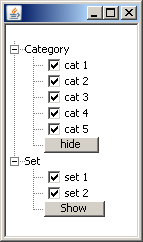 I have read a number of articles that featured source codes from forums and sites on how to show or hide nodes of a JTree. The easiest code that I found that was easy to understand and use are source files labeled InvisibleNode.java and InvisibleTreeModel.java.
You can easily search that in Google to get those files. The result that I wanted to accomplish was to show only 2 checkbox leaf nodes at most if the last leaf node of the parent node has a button labeled HIDE and is clicked. I know it is hard to visualize so I included a snapshot of my JTree.
My JTree‘s parent nodes contain leaf nodes that have checkboxes and a button at the end of each parent node if there consists more than 2 checkbox leaf nodes per parent node. By default the button is labeled HIDE. If I click on it, it will show only 2 checkboxes while hiding the rest (except the button) and the button’s label will change to SHOW. If I click on the button again, it will all all sibling leaf nodes.
Those two Java source files easily did the trick in hiding and showing tree nodes.
Donations appreciated. Every little $ helps. Or click Google +1. Or play the short video on the upper right of this page.











